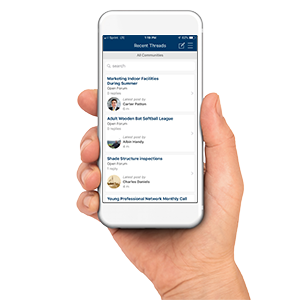
 The new NRPA Connect App will allow you to network with park and recreation professionals across the country conveniently from your smartphone or tablet. With over 20,000+ discussion posts, 5,000+ library resources and 62,000+ professionals, you have endless possibilities to learn and share at your fingertips.
Browse through the discussions, libraries, member directory, communities and more:
- Post new discussions, reply or search specific topics
- Browse library resources and the member directory
- Add contacts and update your profile
- Join a network or community
- Edit community notifications
- Surf volunteer opportunities
iPhone & iPad (MemberCentric/NRPA Connect):
 Download the App for iPhone & iPad. Android (MemberCentric/NRPA Connect):
 Download the App for Android.
Frequently Asked Questions
How do I log in?
When you open the app for the first time, it will ask for your login credentials. This is the same username and password you would use to log into NRPA Connect from your web browser. If you need assistance with your login credentials, please email customerservice@nrpa.org.
How do I find my communities?
From the main menu, scroll down to the “communities” section which, by default, will show all communities you are currently a part of.
How do I join a new community?
From the communities section of the main menu, click the filter button on the right hand side of the communities banner. Choose “Communities I Can Join” for a list of available communities. Once you find one you would like to join, click on the community. From that page, there will be a “Join” button in the top right hand corner. Select that and confirm you would like to join and then just set your communication preferences and hit save.
How do I leave a community?
From the communities section of the main menu, select which community you would like to leave. Once you are on that community’s page, there is a gear icon in the top right hand corner. Click on the gear and at the very bottom of the menu, you will see the option to leave the community.
How do I add an attachment?
You are currently unable to add an attachment through the app. To add attachments, please visit https://connect.nrpa.org/home and login via the webpage.
How to do I find a member to add as a contact?
Open the list menu items, choose People > Search Directory and type the name of the contact you are looking for.
How do I volunteer?
From the main menu of the app, you can find the volunteer section at the very bottom of the first list (before you get to your communities). Choose that and you can search opportunities, view available opportunities as well as see opportunities you have already volunteered for. Select the opportunity you would like to volunteer for and click “volunteer” in that opportunity.
How do I search upcoming NRPA events?
Open the list menu items, choose calendar.
How to do I find a member to add as a contact?
Open the list menu items, choose People > Search Directory and type the name of the contact you are looking for. *Due to the high volume of our membership, this function can take a few seconds before loading.
How do I search a library resource?
Open the list menu items, choose Libraries. To search a specific resource or topic you must choose a certain library in the library options below. We recommend searching the Open Forum library. Libraries > Open Forum > Search Tab